 Trailmix
GitHub
Meeting notes that stay on your computer
Have the meeting. Trailmix hands you the notes: what was decided, who's doing what, and everything that was said, searchable. It works with any call, on a Mac, a Windows PC or Linux, and your meetings never leave your computer unless you choose.
Download Trailmix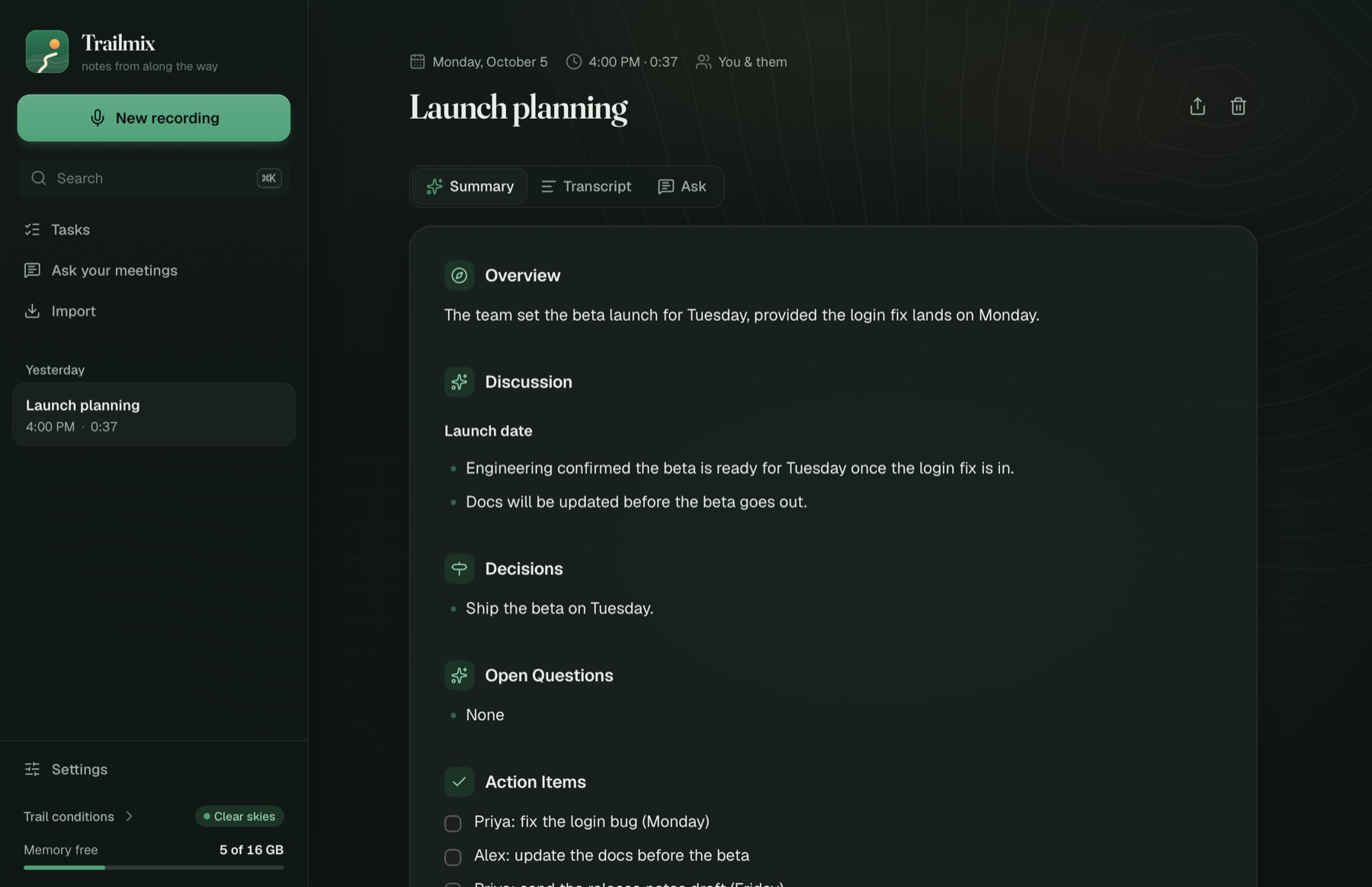
Download
One Trailmix, the same notes and the same privacy on every computer. Each version keeps itself up to date.
Windows Beta
Windows 10 or 11, 64-bit
- Windows (Intel or AMD)
- Windows on ARM (Snapdragon)
- Coming soon.
Linux Beta
Ubuntu 22.04, Debian 12, Fedora 40 or newer
- AppImage, x86_64
- AppImage, ARM64
- Or a package:
- Coming soon.
Every version, with release notes: all releases on GitHub.
Install in three steps
Two minutes, plus a one-time download of the speech models.
Open the download and drag Trailmix to Applications
Double-click the Trailmix download (Trailmix-macos-arm64.dmg, or -x86_64 on an Intel Mac) in your Downloads, then drag the Trailmix icon onto the Applications folder next to it.
Open it the first time with “Open Anyway”
Open Trailmix from Applications. macOS says it “can't verify” Trailmix and offers only Done or Move to Trash: click Done. Then:
- Open System Settings (Apple menu) → Privacy & Security.
- Scroll down to “Trailmix” was blocked to protect your Mac and click Open Anyway.
- Enter your Mac password if asked, then click Open Anyway once more.
Why: Trailmix isn't signed with a paid Apple developer certificate yet, so macOS asks you to confirm once. Updates install from inside the app without this step.
Trailmix walks you through the rest
A short checklist in the app: a sound check that makes sure both sides of your calls are heard (it tells you exactly which macOS prompts to allow), the speech models (about 1.7 GB, once), and a summary model, which it can install for you with one click, or you can use an API key for Claude, OpenAI or Gemini. Then start a call and press Record, in the window or from the menu bar.
Run the installer
Double-click the Trailmix download (Trailmix-windows-x64.exe, or -arm64 on a Snapdragon PC). It installs just for you, with no administrator password.
Click past the “Windows protected your PC” warning
Windows may stop the installer the first time because it doesn't recognize it yet. Click More info, then Run anyway.
Why: the Windows version isn't signed with a paid code-signing certificate yet. Updates install from inside the app without this step.
Trailmix walks you through the rest
A short checklist in the app: the speech models (once), and a summary model or an API key for Claude, OpenAI or Gemini. Trailmix lives in the system tray by the clock. Start a call and press Record there, in the window, or with Ctrl+Alt+Shift+R. It can remind you when a Zoom or Teams call starts.
Make the AppImage runnable, or install the package
For the AppImage: right-click it → Properties → Allow executing as a program, or run chmod +x Trailmix-linux-*.AppImage, then open it. Or install the .deb (Ubuntu, Debian) or .rpm (Fedora, openSUSE) with your package manager.
If the AppImage won't open, install FUSE 2: sudo apt install libfuse2t64 on Ubuntu 24.04, or libfuse2 on other distros.
Make sure you can see its tray icon
Trailmix shows an icon in the system tray. KDE, Cinnamon and most desktops show it straight away; on GNOME, turn on the AppIndicator extension (Ubuntu has it on already).
The AppImage updates itself from inside the app. The .deb and .rpm say when there's a new version, with a link to it.
Trailmix walks you through the rest
A short checklist in the app: the speech models (once), and a summary model or an API key for Claude, OpenAI or Gemini. Then start a call and press Record.
What it does
You have the meeting. Trailmix hands you the notes.
Stop taking notes
Press record and talk. When you hang up, the notes are there: what was decided, who's doing what by when, and what's still open.
Works with any call
Zoom, Google Meet, Teams, Slack, FaceTime or a phone call on your computer. No bot joins, nothing to install for anyone else, nobody notices.
Your meetings stay yours
Everything happens on your own computer. Nothing is uploaded unless you choose a cloud AI to write the notes.
Find anything anyone said
Search every meeting, or just ask: "what did we decide about pricing?" The answer links back to the moment it was said.
A to-do list that writes itself
Every promise made in every meeting lands on one list, ready to tick off, or to send to Traverse as a task.
Work and life, kept apart
Your job, a committee, personal: meetings sort themselves into the right place, and you switch with one click.
Bring your history
Old meetings from Granola, transcripts from Zoom, Teams or Otter, or any audio or video file. They become notes like the rest.
Gets your world right
When it isn't sure of a name or a word, it asks with one tap, and spells it right from then on.
Want the details: models, formats, how the audio is captured? The specs are on GitHub.
Questions
What do I need?
A Mac on macOS 14.2 or later (Apple silicon, or an Intel Mac, where transcribing is slower), a Windows 10 or 11 PC (Intel, AMD or Snapdragon), or a Linux desktop from 2022 or later (Ubuntu 22.04, Debian 12, Fedora 40 or newer, with PipeWire or PulseAudio; the AppImage also needs libfuse2). 16 GB of memory is best for local summaries; with 8 GB, use a cloud AI for summaries or a small local model.
Does anything leave my computer?
Not by default: recording, transcription and summaries all run on your computer. If you add an API key for a cloud AI, only the transcript goes to that provider, to write the notes.
How do updates work?
Trailmix checks for new versions and offers to install them from its window or its menu. On a Mac, macOS asks for the microphone and system audio permissions again after an update, until Trailmix is signed by Apple. On Linux the AppImage updates itself; the .deb and .rpm point you to the new version.
Windows and Linux are “beta”: what does that mean?
They do everything the Mac version does except a few extras that are still coming, and they've had less real-world use, so expect the odd rough edge, and tell us about it from Settings → Feedback.
From the same trail
Trailmix has two siblings, made the same way: free, open source, and your data stays on your computer.
Traverse
What's next, and who's on it. Your own workspace for planning work: tasks, projects, a morning briefing, and an inbox where AI turns threads and meetings into tasks you approve. Trailmix sends it your action items.
Visit Traverse →The Lodge
Who you know, and how well. The people you know, how well you know them and what you know about them, kept in one place on your computer.
Visit The Lodge →